Data Science for Linguists 2025
Course home for
LING 1340/2340
HOME 
• Policies
• Term project guidelines
• Learning resources by topic
• Schedule table
Homework 2: Process the ETS Corpus
This homework carries a total of 80 points.
Goal 1 and part of Goal 2 are due on 1/31 (Fri).
By 2/3 (Mon), complete all tasks except for statistical tests and conclusions.
On 2/5 (Wed), a complete work is due.
See the "Submission" section at the bottom for details.
For this homework, we will explore and process the ETS Corpus of Non-Native Written English, using Python’s numpy and pandas libraries we recently learned.
Dataset
- The corpus was published by the LDC (Linguistic Data Consortium). I have acquired license on behalf of all Pitt faculty and students. I am distributing the data through the privately held “Licensed-Datasets” repo of our class GitHub organization.
- If you haven’t already, clone the repo as your local repository. There’s no need to fork.
- You should keep the data files in its original directory location and its original form. Don’t move or copy them into your working directory! Instead, in your JNB, use the relative path (
'../../Licensed-Datasets/ETSxyz') or absolute path reference ('/Users/narae/Data_Science/xyz') to the data files.
Repo, files and folders
- From HW2 and on, submission will be done via your own personal, private GitHub repository.
- Reason: when a repo originates from our GitHub class org (like “HW1-Repo” did), its forks are visible to everyone in the org, meaning all classmates.
- As an example, take a look at Na-Rae the fake student’s homework submission repo. The visibility is currently set to “public” so you all can see, but other than that you should keep to the structure:
- Name the repo
DS4Ling-Homework - Should have
README.md - Should have
.gitignore, which you can simply copy over from this repo or our “Class-Exercise-Repo” - Your homework files don’t have to have your name in the file name (since this is YOUR repo)
- Do NOT move or copy the ETS corpus data into this repo (see above).
- Keep the repo private.
- Invite me and Riley as collaborators. Go to “Settings –> Collaborators –> Manage access”.
- Name the repo
Goals
The first goal of this work is Basic Data Processing, which involves processing of CSV files and text files. You should build two DataFrame objects: essay_df and prompt_df.
Building essay_df (see screenshot):
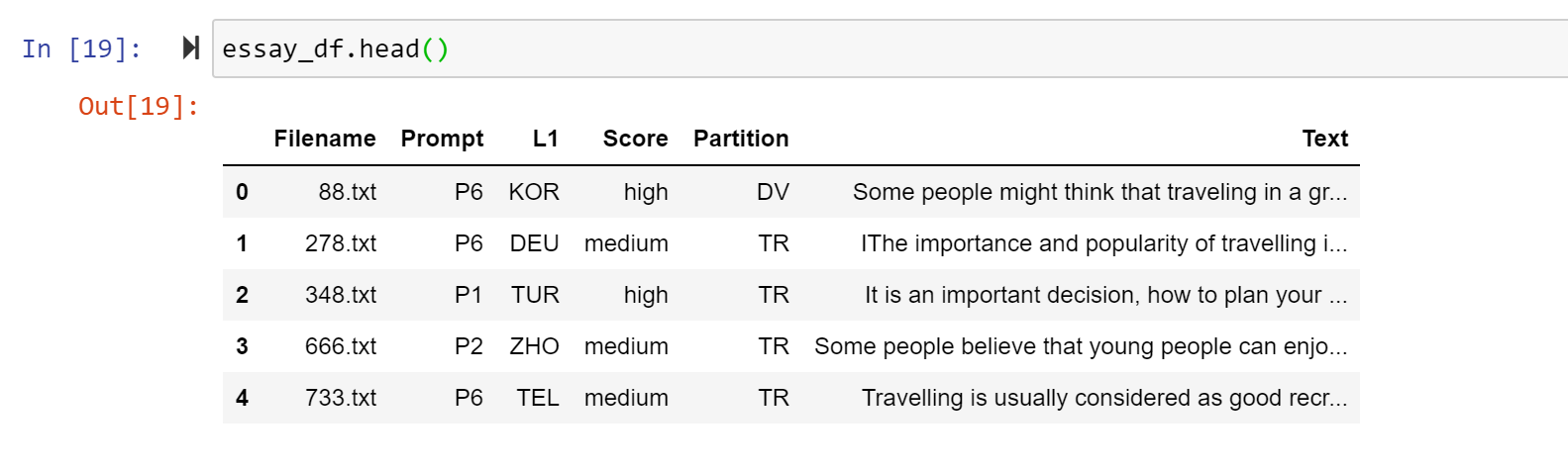
- Start with
index.csvand build a DataFramed namedessay_df. Specifics:- Rename
'Language'column name to'L1', which is a more specific terminology. - Likewise, change
'Score Level'to'Score'. Single-word column names are more handy. (Why?)
- Rename
- Augment the
essay_dfDataFrame with an additional column named'Partition'with three appropriate values: ‘TS’ for testing, ‘TR’ for training, and ‘DV’ for development.- This information you can get from the three additional CSV files, which split the data into thee partitions: training, testing, and development sets.
- There are different ways to approach this. After reading in the three partition CSVs as their own DataFrames, you’ll need to find a way to concatenate and merge them with
essay_df. Alternatively, you can create a dictionary that pairs each file name with its partition label, then use the.map()function.
- Create a new column called
'Text', which stores the string value of each essay content. You will need to find a way to read in each essay text stored as individual files.- There are so many essay files – How to deal with them? You might find
glob.glob()useful: how-to doc here.
- There are so many essay files – How to deal with them? You might find
- As you work on EDA and linguistic analysis, you may create additional columns to hold new data points. I’ll leave these up to you. Initially, the DataFrame should look like the screenshot above.
Building prompt_df (see screenshot):
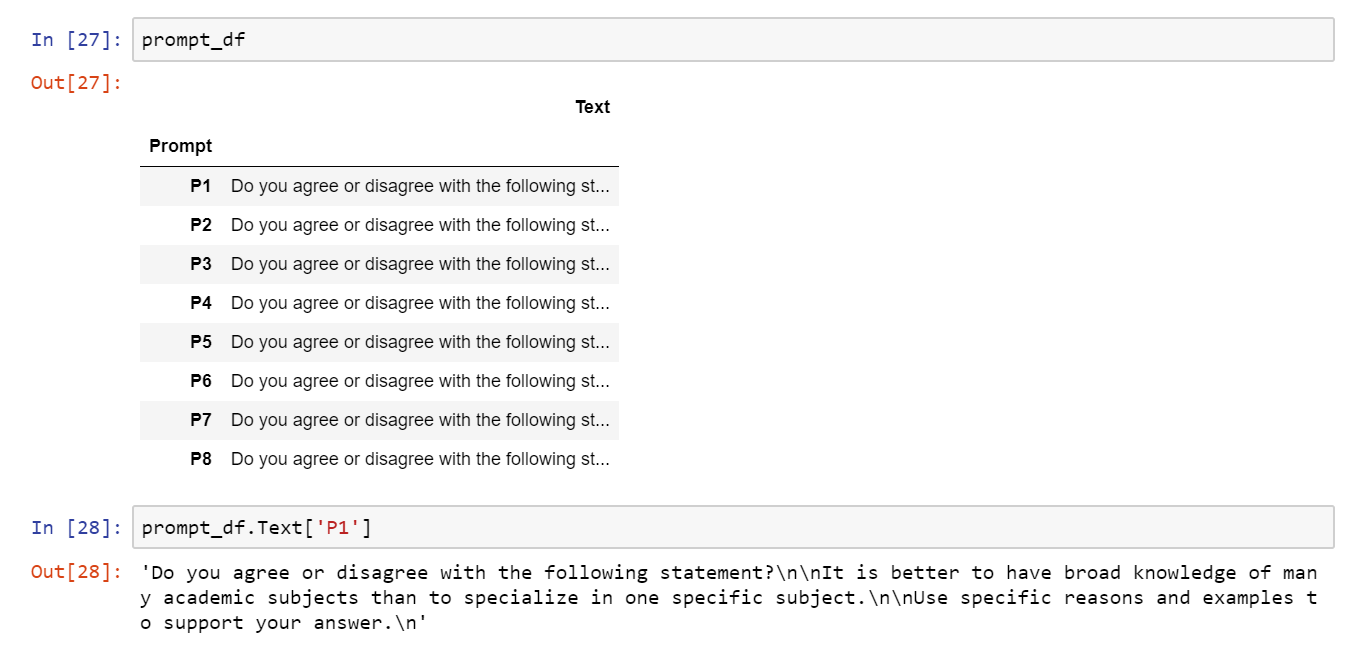
- This is a DataFrame for the prompts.
- It should have two columns:
'Prompt', whose values are ‘P1’, ‘P2’, … ‘P8’.'Text', which holds the content of each prompt as a string.
- Additionally, the row index should be set to the
'Prompt'column. See the screenshot above. - Again,
glob.glob()will help you avoid hard-coding all 8 file names.
The second goal is Exploratory Data Analysis (EDA).
- Read up on documentation in order to gain understanding of the data set. There is a README file, a PDF document, and the LDC publication page. What is the purpose of this data, what sort of information is included, and what is the organization?
- Then, explore the data to confirm the content. For example, the PDF document contains tables illustrating the make-up of the data and various data points. Don’t take their word for it! You should find a way to confirm and demonstrate these data points through your code.
- Visualization: Try out at least one plot/graph.
The third and last goal is Linguistic Analysis. In particular, we want to be able to highlight quantitative differences between three response groups: low, medium and high levels of writing proficiency. Explore the following:
- Text length: Do learners write longer or shorter responses?
→ Can be measured through average text length in number of words - Syntactic complexity: Are the sentences simple and short, or are they complex and long?
→ Can be measured through average sentence length - Lexical diversity: Are there more of the same words repeated throughout, or do the essays feature more diverse vocabulary?
→ Can be measured through type-token ratio (TTR). In interpreting the figure, be mindful of the big caveat. (Even better if you can find a way to counter it, but that’s optional.) - Vocabulary level: Do the essays use more of the common, everyday words, or do they use more sophisticated and technical words?
→ a. Can be measured through average word length (common words tend to be shorter), and
→ b. [OPTIONAL!] Can be measured against published lists of top most frequent English words such as the Google Web Trillion Word Corpus (excerpt available on Peter Norvig’s site ascount_1w.txt).
There are four total measurements plus an optional one (4b). In interpreting the measurements’ output, you must employ statistical tests such as the t-test or one-way ANOVA to demonstrate whether or not a difference is significant.
Additional pointers on analysis: If you are going for 4b., which is the most involved kind of task, you should revisit this “Bulgarian vs. Japanese EFL Writing” homework from LING 1330 Intro to CompLing. But again, this metric is strictly optional.
Your report, aka Jupyter Notebook file
- At the top of your Jupyter Notebook should be a markdown cell with your name, email and date.
- The second cell, another markdown cell, should contain a brief summary of the data set. This is just a starting point though – probing and exploring the data set should be done throughout your report.
- Don’t forget to make use of markdown cells for organization, explanation and notes. Use comments as you see fit.
- Remember: your Jupyter Notebook should be much more than a Python script: you should treat it as a written project report with embedded Python code. That means, producing correct numbers is not enough: you should provide your own interpretation of these numbers as part of your linguistic analysis. Also important: you should show your data and your process, so your Notebook is easy to follow.
- Your report should have at least these three main sections. See the “Goal” section about contents.
- Basic data processing
- Exploratory data analysis (EDA)
- Linguistic analysis
Submission
- When you think you are finished, “Restart & Run All” your Jupyter notebook one last time, so the output is all orderly and tidy. Save the file.
- After the usual local Git routine, push to your own GitHub repo one last time. Check it to make sure your file is there and everything looks OK.
- That’s it! Since the repo is shared with me and the TA, we have access.
-
Submission is done in three stages.
- 1/31 (Fri) Finish Goal 1 (“Basic data processing”), and then get started with Goal 2 (“EDA”).
- 2/3 (Mon) Complete all tasks for Goal 2 and Goal 3 (“Linguistic Analysis”) except for statistical tests. Hold off drawing conclusions too.
- 2/5 (Wed) Submit your completed HW2.
- No need to make separate JNB files for each submission! That’s what git versions are for.